Token Launch Checklist: 9 Steps for Solana, Ethereum, BNB Chain, and Sui
A step-by-step crypto token launch checklist: choose the chain, prepare metadata and supply, set authority, create the token, verify it, add liquidity, and distribute. Screenshots for each network.
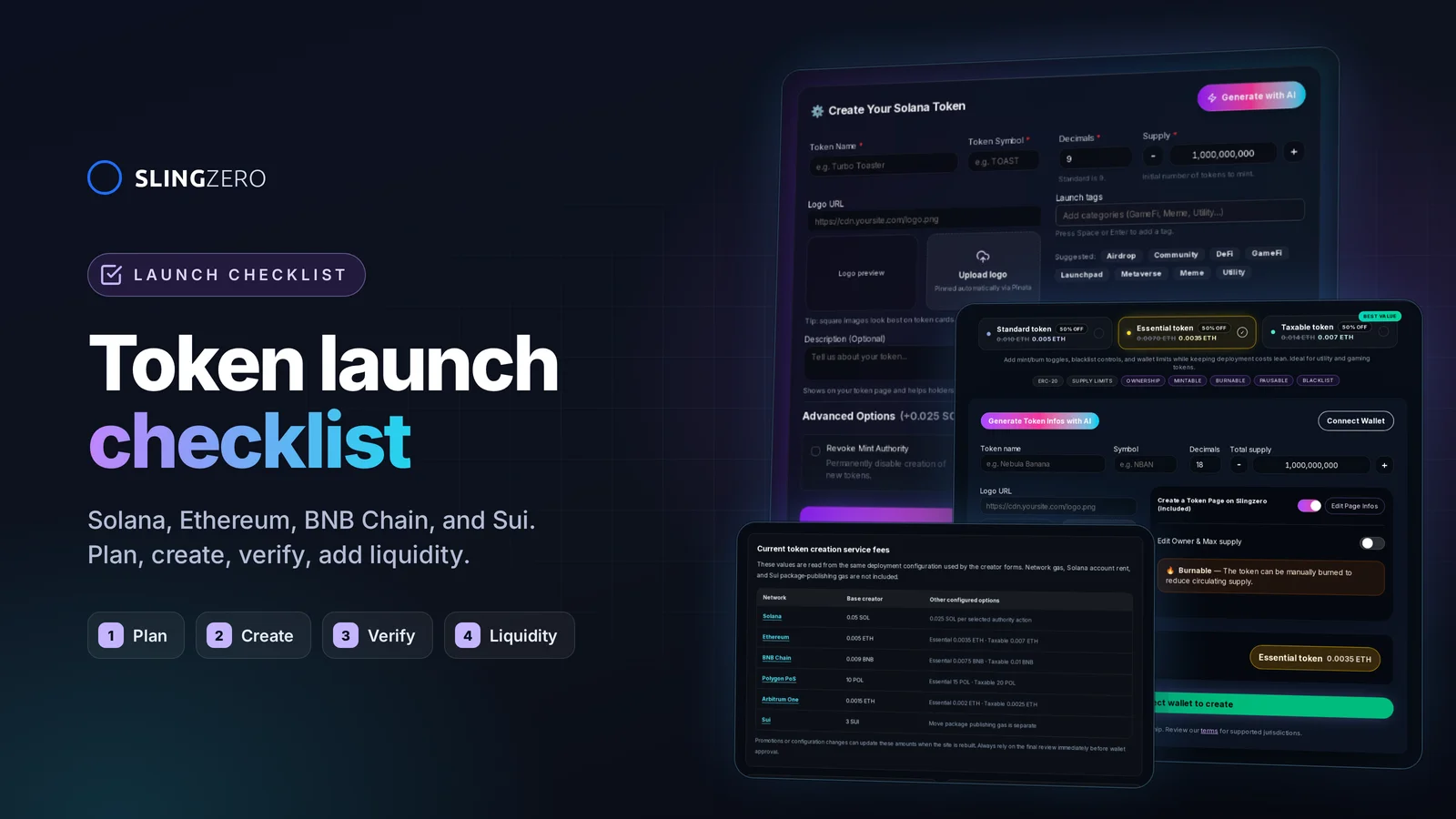
The token launch checklist at a glance
A token launch goes smoothly when every decision is made before the first Mainnet signature. Work through these nine steps in order:
- Choose the chain: Solana (SPL), Ethereum (ERC-20), BNB Chain (BEP-20), or Sui (Move Coin).
- Prepare token details: name, symbol, decimals, supply, logo, description, and links.
- Rehearse on a test network: Solana Devnet, an EVM testnet, or Sui Testnet.
- Decide authority and ownership: what to revoke, transfer, or keep.
- Create the token with the creator for your chain.
- Verify it the way a holder would: explorer, wallet, and token page.
- Add liquidity with a documented price and LP policy.
- Distribute tokens through a multisender, not manual transfers.
- Manage the token after launch and publish every change.
Each step is explained below, with screenshots of the Slingzero creators and tools you use along the way.
Working rule: keep one private launch record with every proposed value and one public record with the final identifier, authority state, transaction proof, and official links. Never rely on a ticker or logo to identify the asset.
Step 1: Choose the right chain before you create the token
Choosing the network is not a branding decision. It affects fees, wallet support, liquidity venues, explorer verification, and how your team manages supply later.
For primary definitions, compare the official Solana token documentation, the ERC-20 token standard, the BNB Chain BEP-20 proposal, and the Sui Coin Standard documentation.
- Solana: SPL token, identified by a mint address, controlled by mint, freeze, and metadata authorities. Liquidity usually on Raydium.
- Ethereum: ERC-20 contract, identified by a contract address, controlled by the owner or roles in the contract. Liquidity usually on Uniswap.
- BNB Chain: BEP-20 contract, identified by a contract address, controlled by the owner or roles in the contract. Liquidity usually on PancakeSwap.
- Sui: Move Coin, identified by a
0xpackage::module::COINtype, controlled by TreasuryCap, UpgradeCap, and CoinMetadata objects. Liquidity on Cetus, Turbos, or Bluefin.
Solana: when the asset must be an SPL token
Choose Solana when your users expect an SPL mint, Solana wallets, and Solana-native liquidity. The Solana Token Creator puts the mint, metadata, supply, and authority decisions in one form.
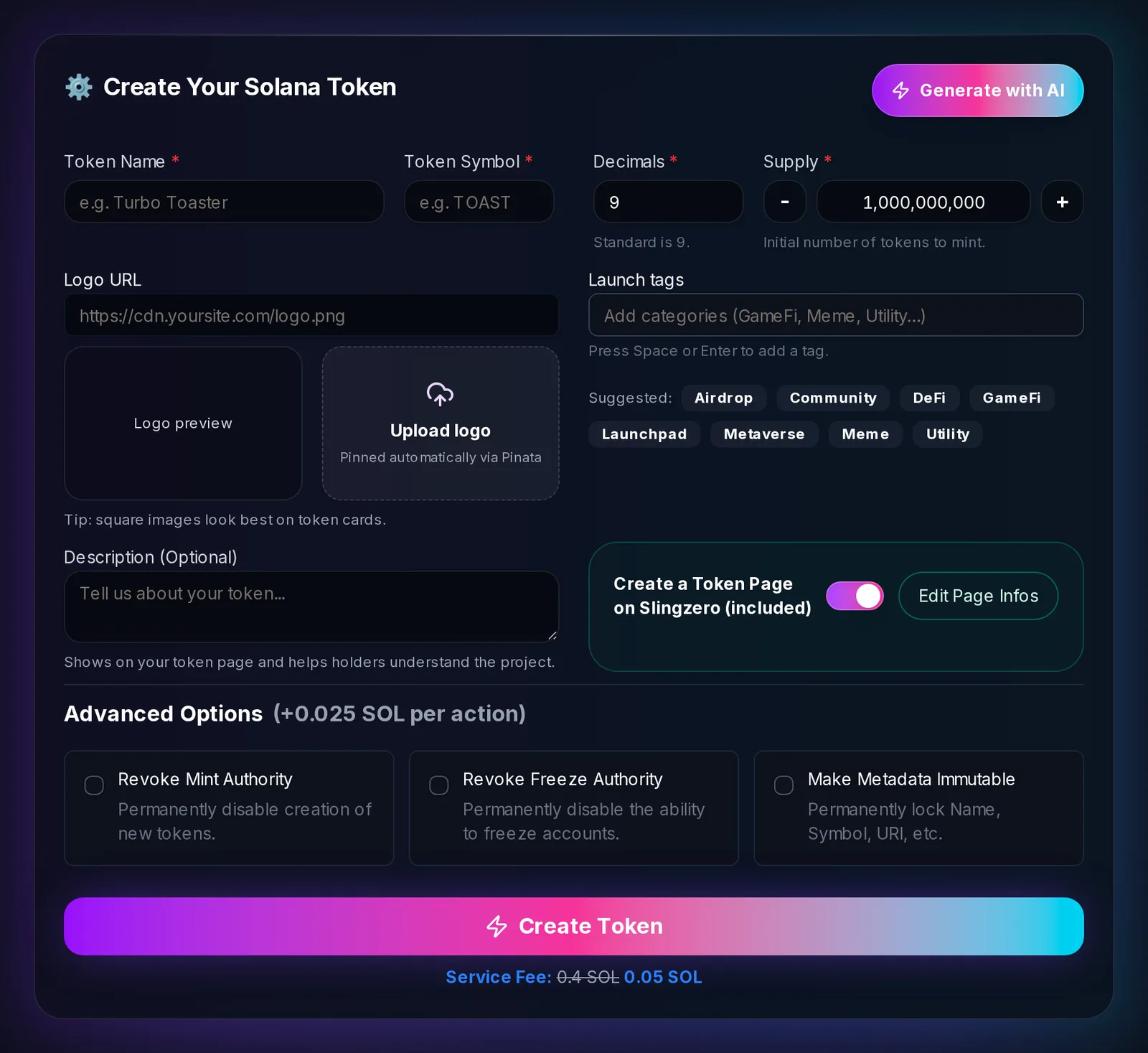
Check before choosing it:
- Whether the launch wallet should keep mint, freeze, or metadata authority.
- Which Solana wallets and liquidity venue your users already use.
- Whether every tool you need supports the selected cluster and token program.
Ethereum: when integrations expect an ERC-20 contract
Choose Ethereum when wallets, applications, or partners expect an ERC-20 contract on Ethereum. The Ethereum Token Creator offers three contract templates (Standard, Essential, and Taxable), each with a different set of owner controls, and deploys from your connected wallet.
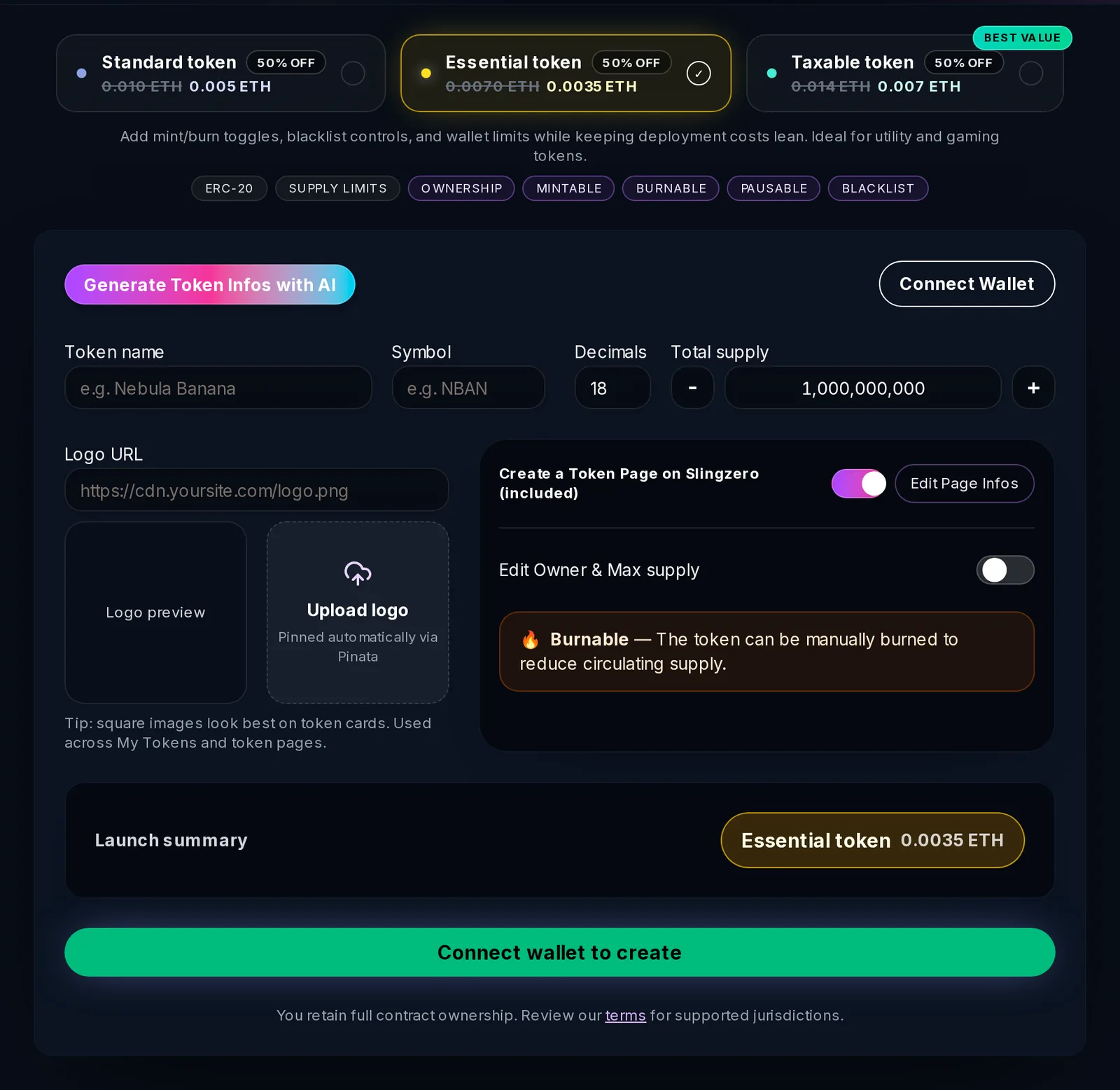
Check before choosing it:
- Current gas and the ETH balance of the deploying wallet.
- Every owner-only function in the selected template (mint, burn, pause, blacklist, tax).
- Whether your integrations require verified source code or a specific interface.
- The quote asset, price, and LP custody plan for any planned liquidity.
BNB Chain: when the launch belongs in the BNB ecosystem
BNB Chain uses the same EVM contract model, and its fungible tokens are called BEP-20 tokens. Use the BNB Chain Token Creator when your wallets, explorer, and liquidity are on BNB Chain.
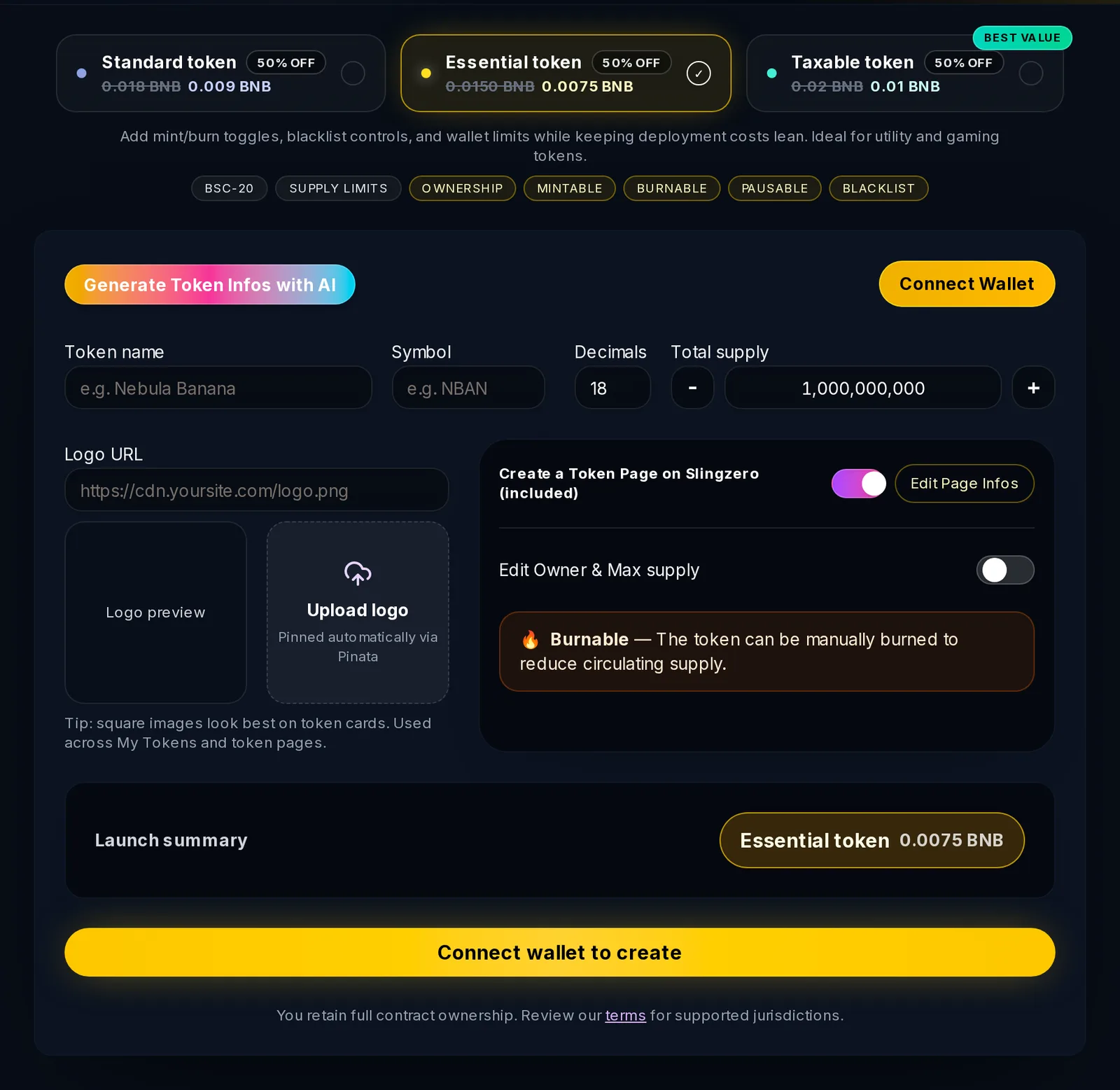
Check before choosing it:
- Current BNB gas and the deploying wallet balance.
- Ownership, minting, tax, exemption, and transfer controls in the template.
- BscScan verification and where you will publish the official contract address.
- PancakeSwap pool parameters and LP custody, if liquidity is planned.
Sui: when the asset should use Move packages and objects
Choose Sui when the project is built around a Move-native Coin type and object-owned capabilities. Create Sui Token generates the package and lets you lock capabilities at publish time. See the full walkthrough in How to Create a Sui Coin.
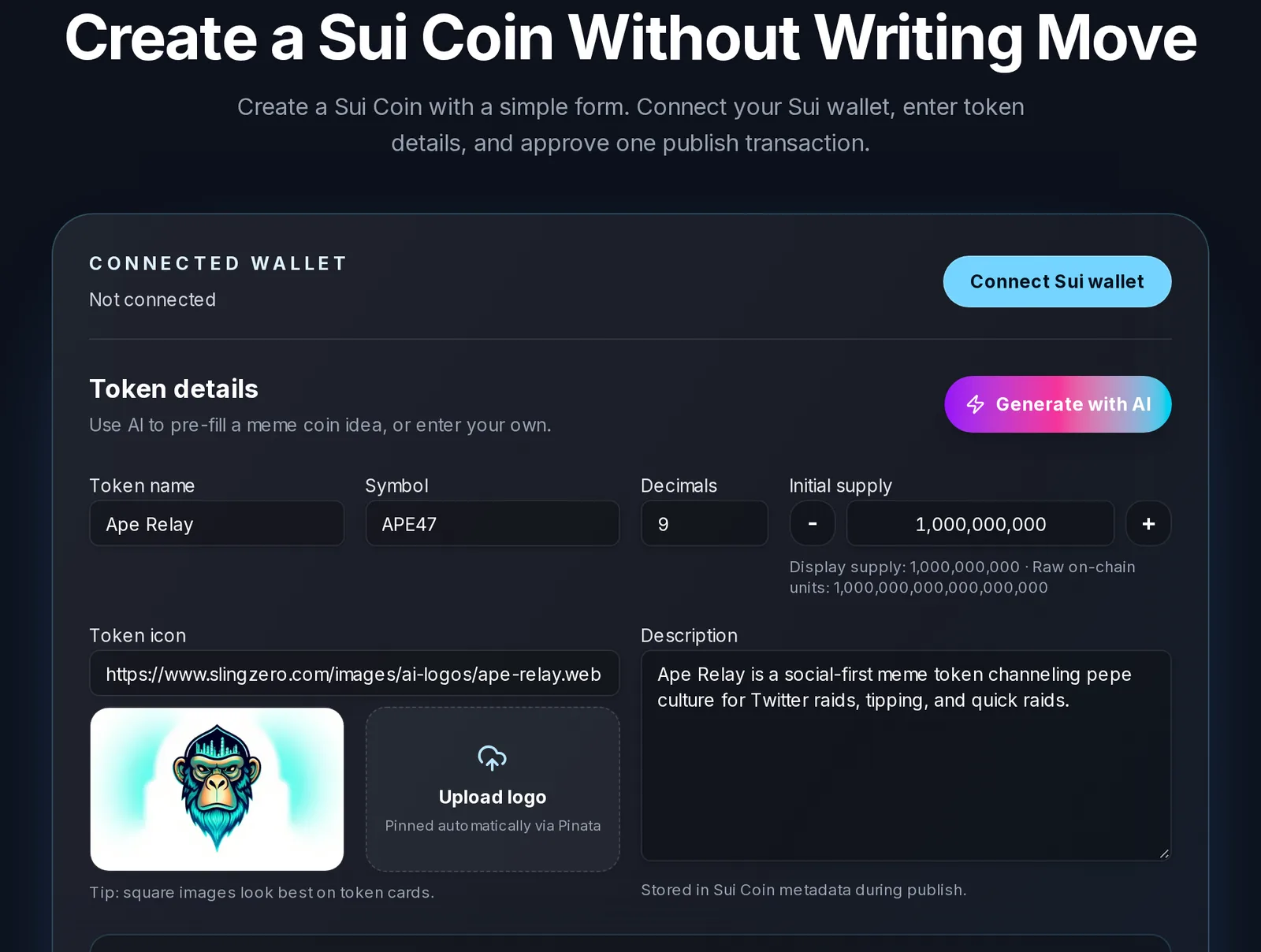
Check before choosing it:
- The full
package::module::COINidentifier integrations will use. - Who should own the
TreasuryCap,UpgradeCap, and any regulated-coinDenyCap. - Whether supply or package upgrades should be locked permanently at publish.
Step 2: Prepare token details before opening the creator
A token creator is fastest when your inputs are ready. Prepare a launch sheet with these fields.
Core token fields
- Token name: The exact public name. Avoid spelling changes after launch.
- Symbol: Short and recognizable. Wallets and DEX interfaces truncate long symbols.
- Decimals: Keep the default unless your model requires otherwise. Solana SPL tokens and Sui coins usually use 9; ERC-20 and BEP-20 tokens usually use 18.
- Initial supply: Match your tokenomics, not a marketing number.
- Logo: A square image that stays legible at small sizes.
- Description: A plain explanation that reads well in wallets, explorers, and token pages.
- Website and socials: Durable URLs the project controls.
Public identity fields
Use the same name, symbol, network, and full on-chain address everywhere. Your launch copy should answer:
- What does the token do?
- Which chain is it on?
- What is the official mint, contract, or coin type?
- Is supply fixed or expandable?
- Who controls ownership or authority?
- Where can holders verify liquidity?
Step 3: Rehearse the launch on a test network
Never make the first full run on launch day. A rehearsal exposes wallet issues, metadata problems, team confusion, and missing funds.
- Solana: create the token on Devnet from Create Solana Token.
- Ethereum and BNB Chain: use the relevant testnet if your process requires a dry run.
- Sui: select Sui Testnet in Create Sui Token.
During rehearsal, confirm:
- The correct wallet is connected.
- The token shows the expected name, symbol, logo, and decimals.
- Network fees and Slingzero service fees are understood.
- The team knows which wallet signs each transaction.
- The activity record appears in Activity.
- The token loads in My Tokens where supported.
Step 4: Decide authority and ownership before minting
Authority choices decide what the issuer can still change after launch. Write a policy for each control before you create the token. For a deeper comparison, read Token Authority Decisions: Revoke, Transfer, or Retain Control.
Solana SPL token authorities
- Mint authority: whether more tokens can be minted.
- Freeze authority: whether token accounts can be frozen.
- Metadata update authority: whether name, symbol, logo, or URI can change.
Many public launches revoke mint authority once final supply is minted, and also revoke freeze authority and lock metadata. You can do this at creation in the creator's Advanced Options, or later with Revoke Mint Authority, Revoke Freeze Authority, and Make Metadata Immutable.
ERC-20 and BEP-20 ownership
On Ethereum and BNB Chain, an owner or admin role can control minting, taxes, exclusions, and other behavior depending on the template. Explain whether ownership is retained, transferred to a multisig, or renounced. Use Ethereum Revoke Ownership or BNB Chain Revoke Ownership only after confirming the token no longer needs its owner functions.
Sui capability objects
Sui coins are controlled by capability objects such as TreasuryCap and UpgradeCap. Decide which to freeze at publish, which to keep, and who holds them.
Step 5: Create the token with Slingzero
With the launch sheet and authority policy ready, open the creator for your chain. Service fees are shown in each creator before you sign, and the Pricing page lists the current fees for every network.
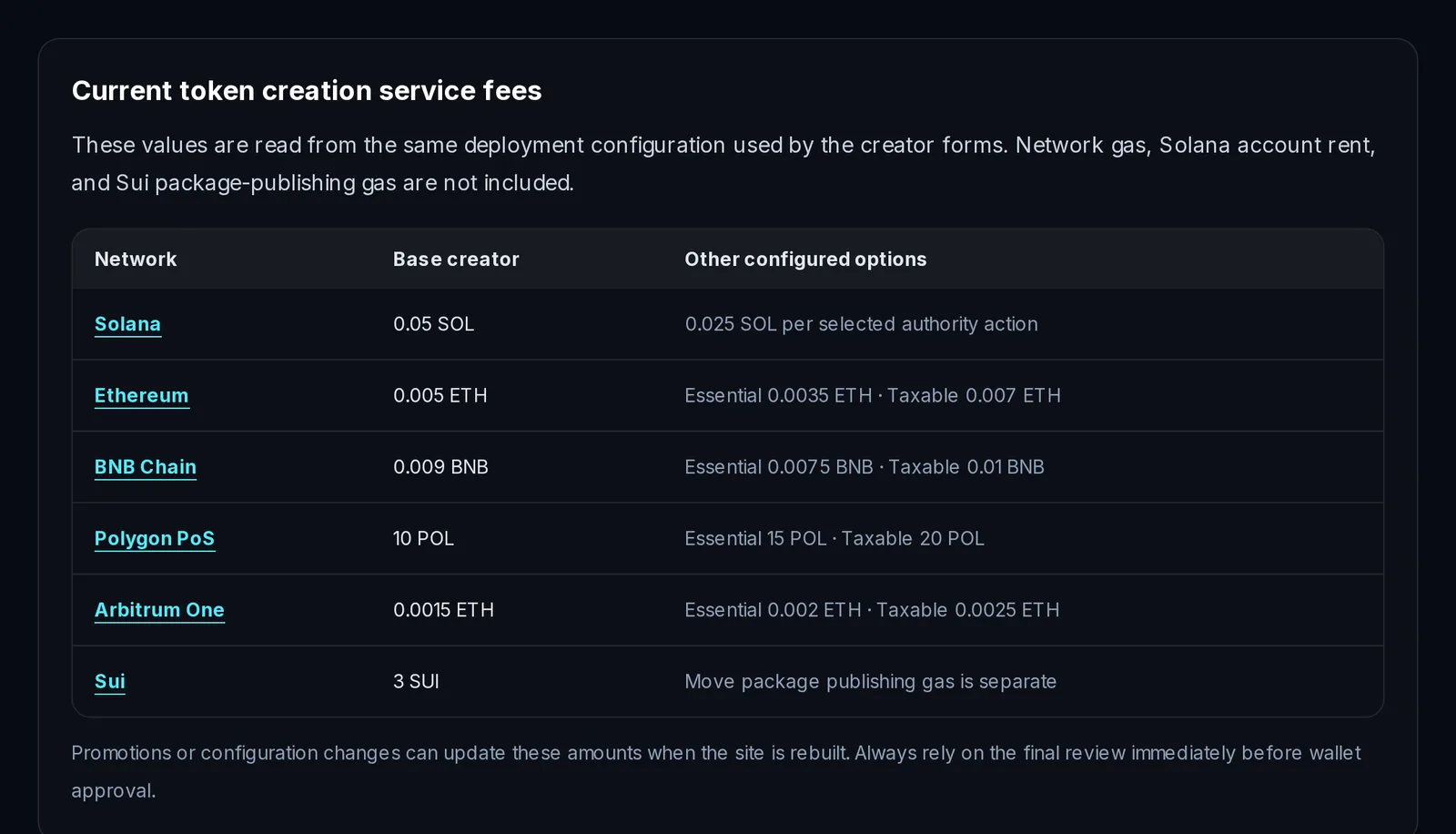
Network gas, Solana account rent, and Sui package-publishing gas are paid to the blockchain and are separate from the service fee.
What to record for each chain after launch:
- Solana (Create Solana Token): mint address, mint and freeze authority status, metadata URI, explorer link.
- Ethereum (Create Ethereum Token): contract address, owner status, supply and tax settings, Etherscan link.
- BNB Chain (Create BNB Chain Token): contract address, owner and tax status, BscScan link.
- Sui (Create Sui Token): coin type, package ID, transaction digest, capability custody.
After creation, use Solana Tools, Ethereum Tools, BNB Chain Tools, or Sui Tools for follow-up operations.
Step 6: Verify the token immediately after creation
Before you announce, verify the token the way a holder would:
- The official mint address, contract address, or Sui coin type.
- Name, symbol, decimals, logo, and description.
- Owner, mint authority, freeze authority, or capability custody.
- The explorer page and the public token page.
- How the token appears in common wallets.
- Whether it loads in the relevant Slingzero management page.
Publish the official identifier in one canonical place. Do not let the first public source be a chat message that can be copied incorrectly.
Step 7: Add liquidity with a documented plan
Liquidity should not be improvised. Choose the DEX, quote asset, launch price, slippage guidance, and LP custody policy before you add funds. On Solana, follow How to Create a Liquidity Pool on Solana for a step-by-step Raydium walkthrough.
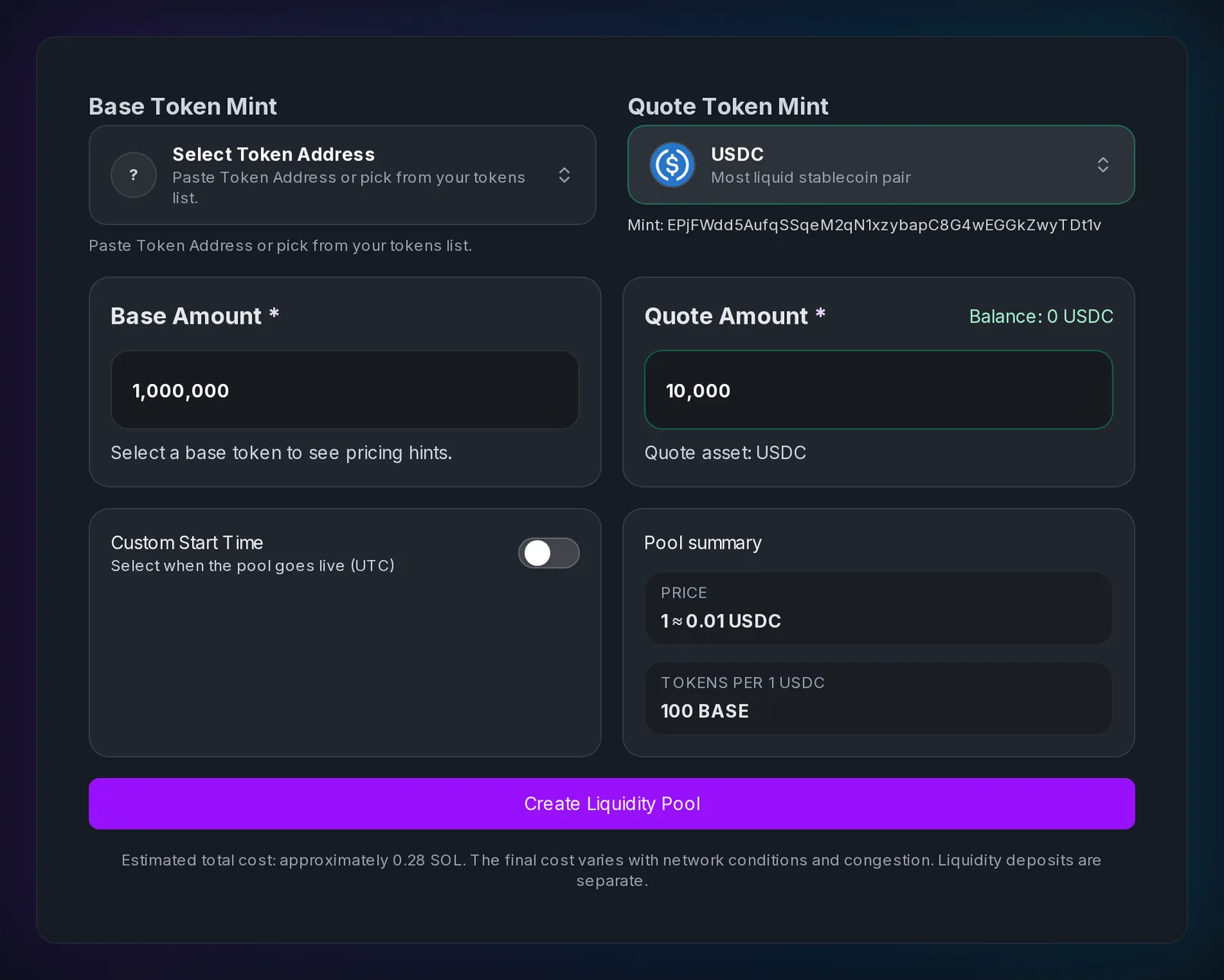
Liquidity tools by chain:
- Create Raydium Liquidity Pools on Solana and Manage Raydium Liquidity
- Plan Ethereum liquidity ratios and Manage Uniswap Liquidity
- Plan BNB Chain liquidity ratios and Manage PancakeSwap Liquidity
- Sui Liquidity Hub for Cetus, Turbos, and Bluefin handoffs
Publish the pool address, initial token and quote amounts, LP owner or lock status, transaction hash, and slippage guidance for early holders.
Step 8: Distribute tokens without manual wallet mistakes
Airdrops, contributor allocations, and community rewards are where launch teams make spreadsheet mistakes. Use a multisender to send to many wallets in batches.
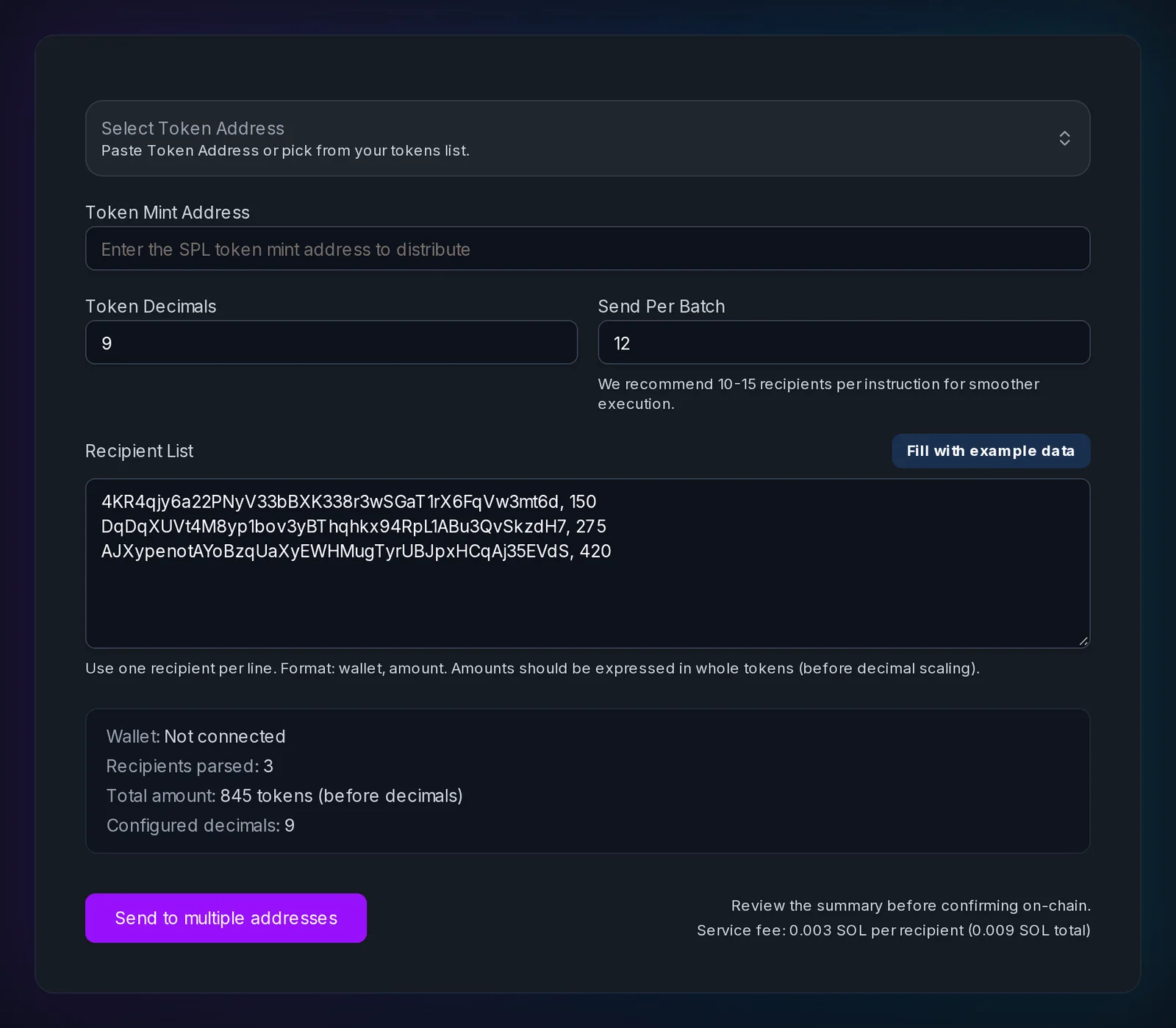
Slingzero multisenders: Solana, Ethereum, BNB Chain, and Sui.
Before sending:
- Validate wallet addresses and remove duplicates.
- Send a small test batch first.
- Keep the CSV as your record.
- Publish the transaction hashes for public distributions.
Step 9: Manage the token after launch
The launch is not complete when the token exists. Post-launch work includes supply changes, burns, liquidity updates, metadata updates, holder support, and incident response.
- My Tokens for tracking and Activity for history.
- Burn: Solana, Ethereum, BNB Chain, Sui.
- Mint, while still allowed: Solana, Ethereum, BNB Chain, Sui.
- Update Solana Metadata before metadata is made immutable.
Trusted external references
- Solana token documentation for SPL token concepts.
- ERC-20 standard and the ethereum.org ERC-20 guide.
- BNB Chain BEP-20 proposal.
- Sui Coin Standard.
- Solana Explorer, Etherscan, BscScan, and Suiscan for public verification.
FAQ: token launch checklist
Fast answers for founders comparing token launch, authority, liquidity, and post-launch workflows.
What should be on a token launch checklist?
At minimum: the chain and token standard, final name, symbol, decimals, supply and logo, a test-network rehearsal, an authority or ownership policy, the official on-chain identifier, explorer verification, a liquidity plan with LP custody, a distribution plan, and a public page that records all of it.
Can I create a crypto token without coding?
Yes. Slingzero has no-code creators for Solana SPL tokens, Ethereum ERC-20 tokens, BNB Chain BEP-20 tokens, and Sui coins. You still review and sign every transaction in your own wallet.
How much does it cost to launch a token?
It depends on the chain. Slingzero's base creation fee is currently 0.05 SOL on Solana and 3 SUI on Sui, and EVM fees depend on the contract template. Network gas or rent is paid separately. The Pricing page has the current table, and each creator shows the exact fee before you sign.
How do I choose a chain for a token launch?
Start with the token type your users and integrations need: an SPL mint, an ERC-20 or BEP-20 contract, or a Sui Move Coin. Then compare fees, wallet support, management controls, and where liquidity will live. No network is best for every project.
Should I revoke mint authority?
If supply should be fixed, revoking mint authority proves on-chain that no more tokens can be created. If future emissions are part of the model, keep the authority under a documented custody policy instead.
Do I need liquidity on launch day?
Most public tokens need liquidity so holders can trade. Whatever the timing, document the pool address, LP policy, and initial price before you promote the token.
How do I make my token launch easy to verify?
Publish one permanent page with the chain, token type, full mint or contract address, authority status, liquidity pool, and official links, and link to it from every project channel.
Final launch checklist
- Pick the chain and document why.
- Prepare name, symbol, decimals, supply, logo, and links.
- Rehearse the launch on a test network.
- Define authority, ownership, or capability custody.
- Create the token with the correct Slingzero creator.
- Verify metadata, explorer pages, and management pages.
- Add liquidity and publish the proof.
- Distribute tokens with a multisender.
- Track and publish every post-launch change.
When the launch record is complete, open the creator for your network: Solana, Ethereum, BNB Chain, or Sui. Recheck the network, identifier, fee, and irreversible authority choices in the wallet prompt before signing.